PropMon
Live operational picture of your proposal pipeline,
with zero workflow change for proposal writers.
LRL Engineering · 2026
Today
You only know how you did when it's already over.
By the time the picture is clear, the proposals are already won, lost, or forgotten.
The promise
Two things, at once.
A live operational picture
Know what's happening in the business now — while you can still act — instead of looking back when it's all over.
Zero workflow change
Proposal writers save files where they always do. No upload UI. No metadata form. No app to open just to file something.
Proposal writers don't change a thing. PMs answer one weekly email. Everyone else just watches the dashboard.
Nothing.
Your existing workflow
Write proposal
Save to project folder
Send to client
Underneath, invisibly
If you can save a file, you're already using PropMon.
Three pieces, one job.
Watcher
Watches your proposal folders. Notices new PDFs the moment they land.
Extractor
Reads the document. Pulls out client, scope, PM, timeline, value. Scores quality.
Dashboard
Surfaces the live picture. Filters, slices, drills, alerts.
All three run quietly in the background. You only ever interact with the dashboard.
Right now
The headline numbers, always live.

Open proposals · dollars in flight · win rate · $/PM this quarter — all current to the last ingest.
Performance
Dollars per PM, by month
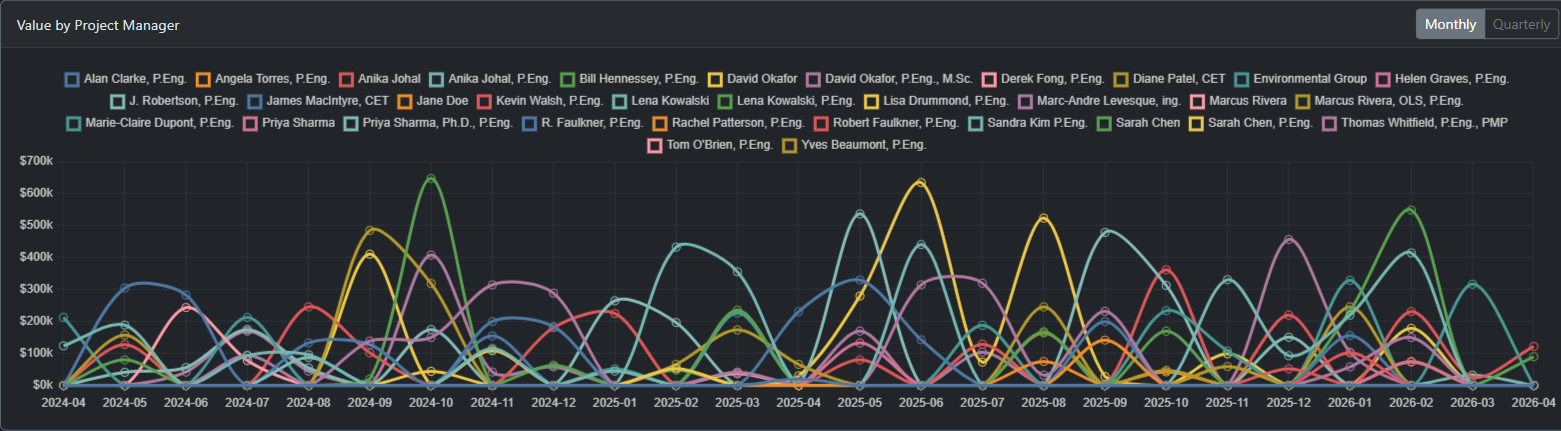
Who's been the engine this month? It's never a guess.
Performance
Dollars per PM, by quarter
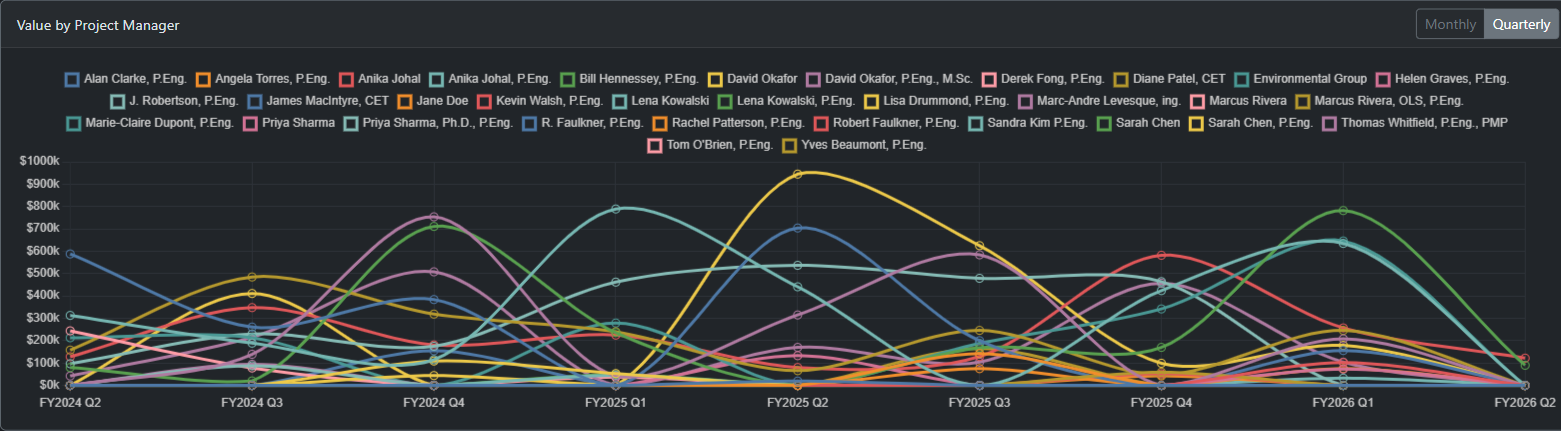
Quarterly view smooths the noise. Fiscal-year aware.
Conversion
Win rate, per PM
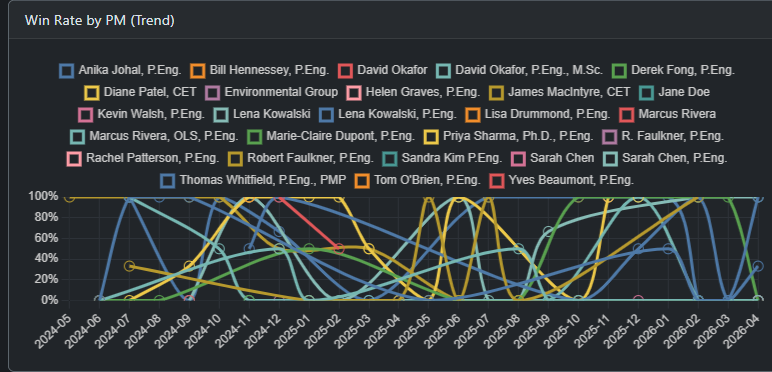
Volume isn't quality. Win rate tells you who's really converting.
Conversion
Win rate, per discipline
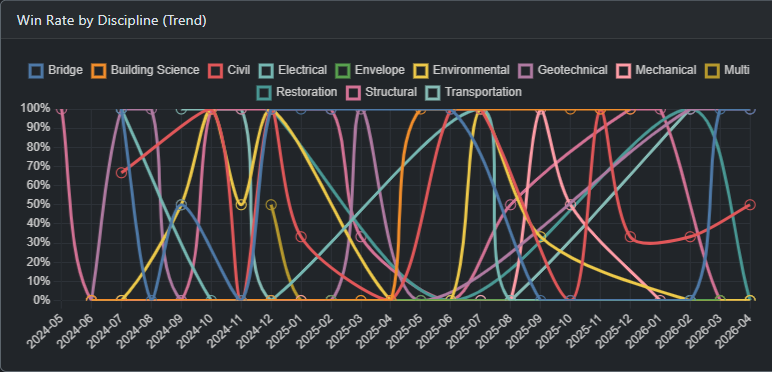
Some disciplines convert better than others. Including 'multi' for cross-scope work.
Pipeline health
Proposals aging silently
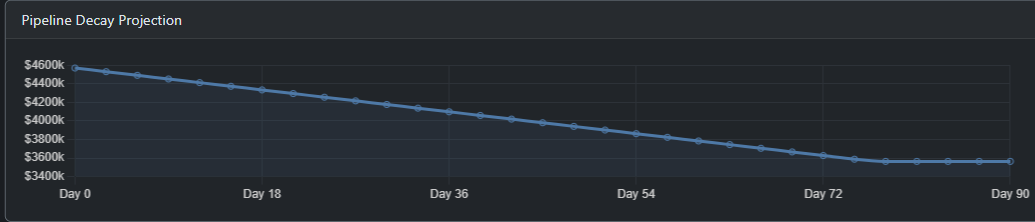
How many proposals have been sitting too long? PropMon ranks them by PM.
Pipeline health
Time to decision
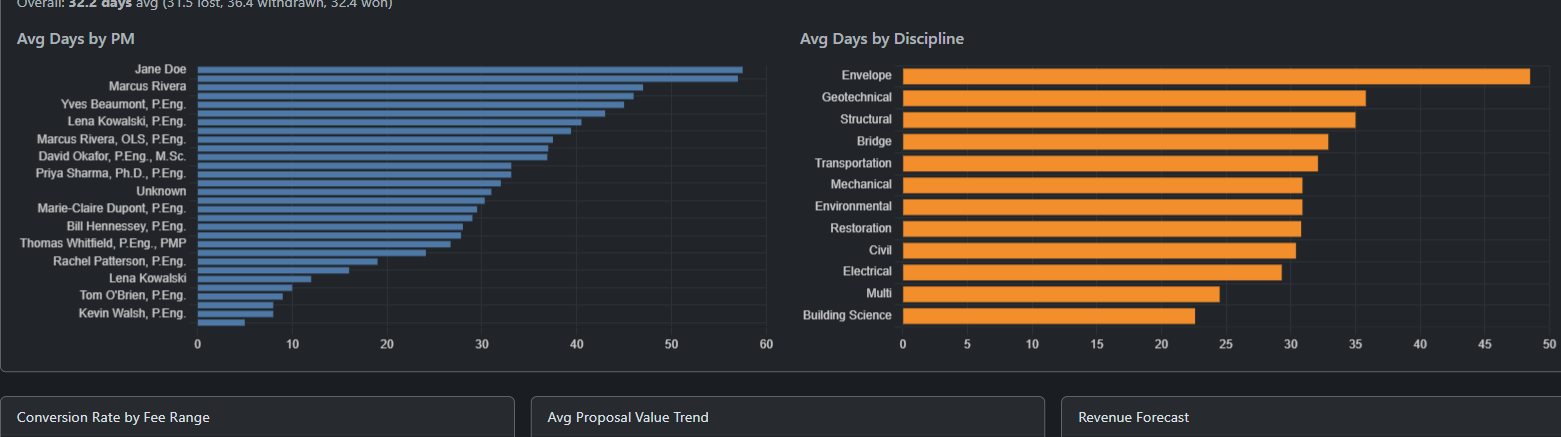
How fast does the pipeline move? By PM, by discipline, by value range.
Quality
Completeness scores
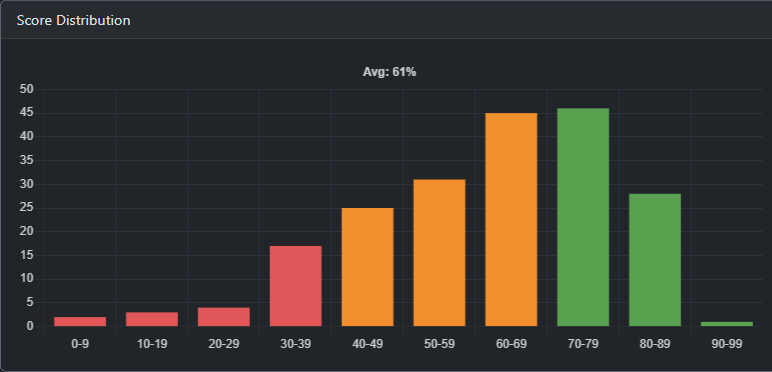
Not just whether it landed — whether it was a complete document when it did.
Per person
PM scorecards
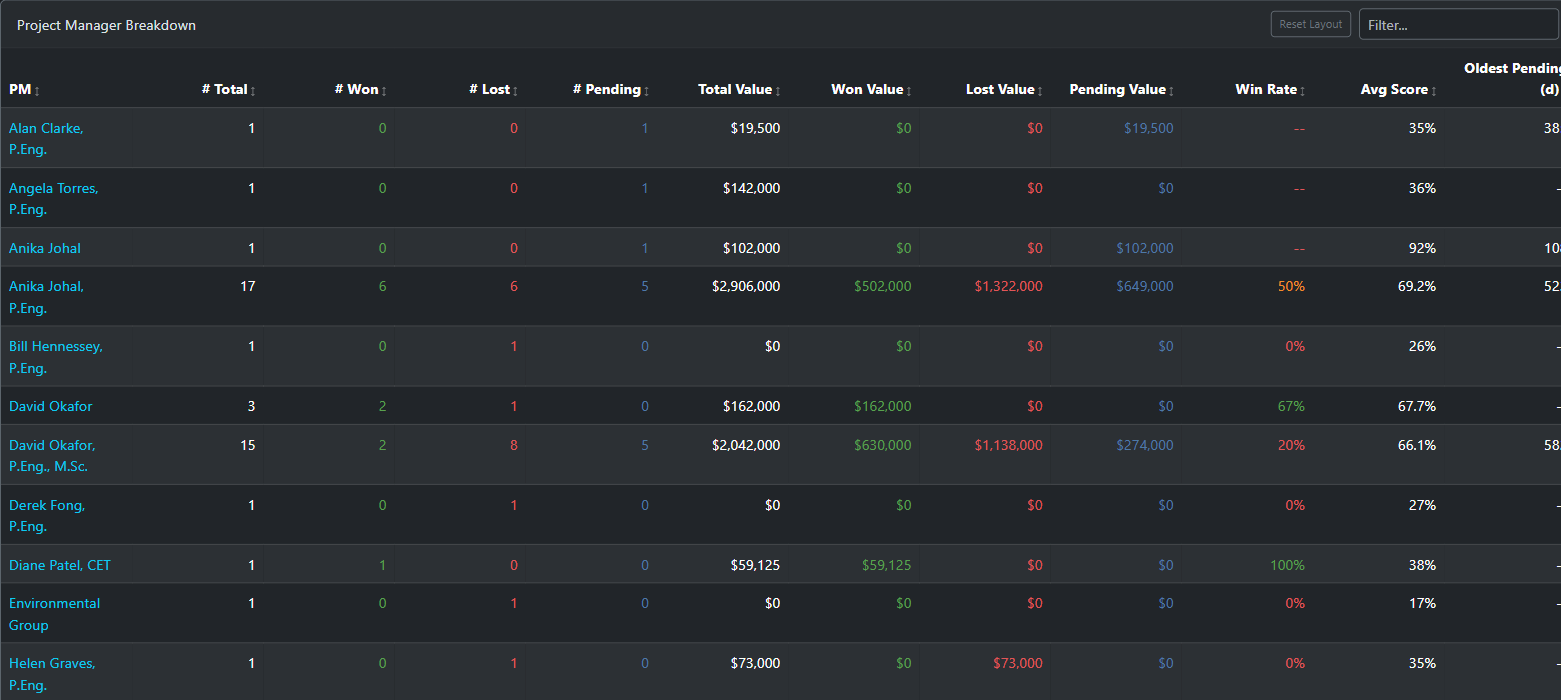
Everything above, rolled into a single page per PM. For 1:1s, for reviews, for self-awareness.
Slice it your way
Smart search syntax cuts the live data on demand.
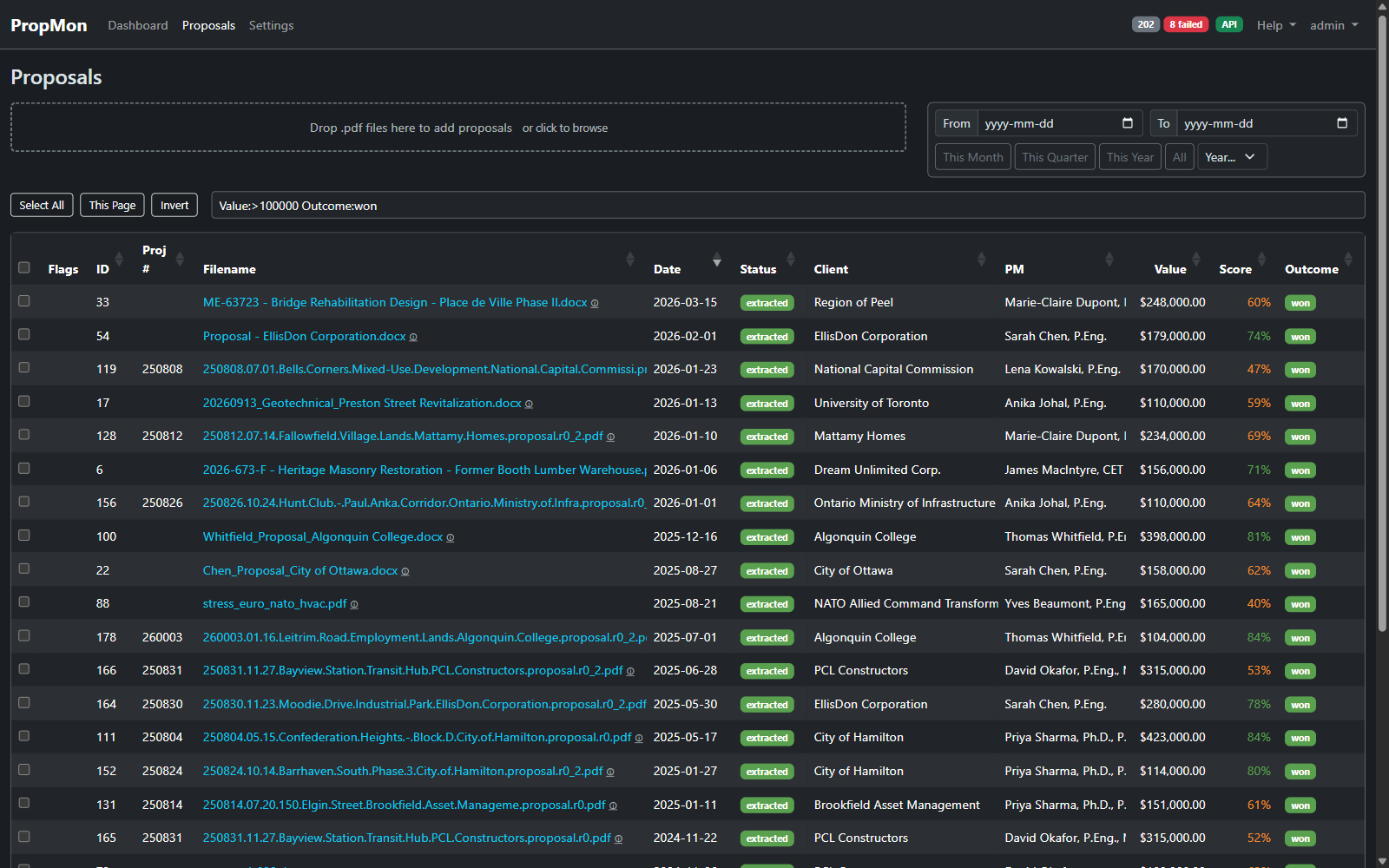
PM:Smith
Value:>10000
Status:extracted
Discipline:structural
Outcome:lost
Combine any of the above. Hit enter. The dashboard rewrites itself.
Drill in
Every column, every filter, every slice.
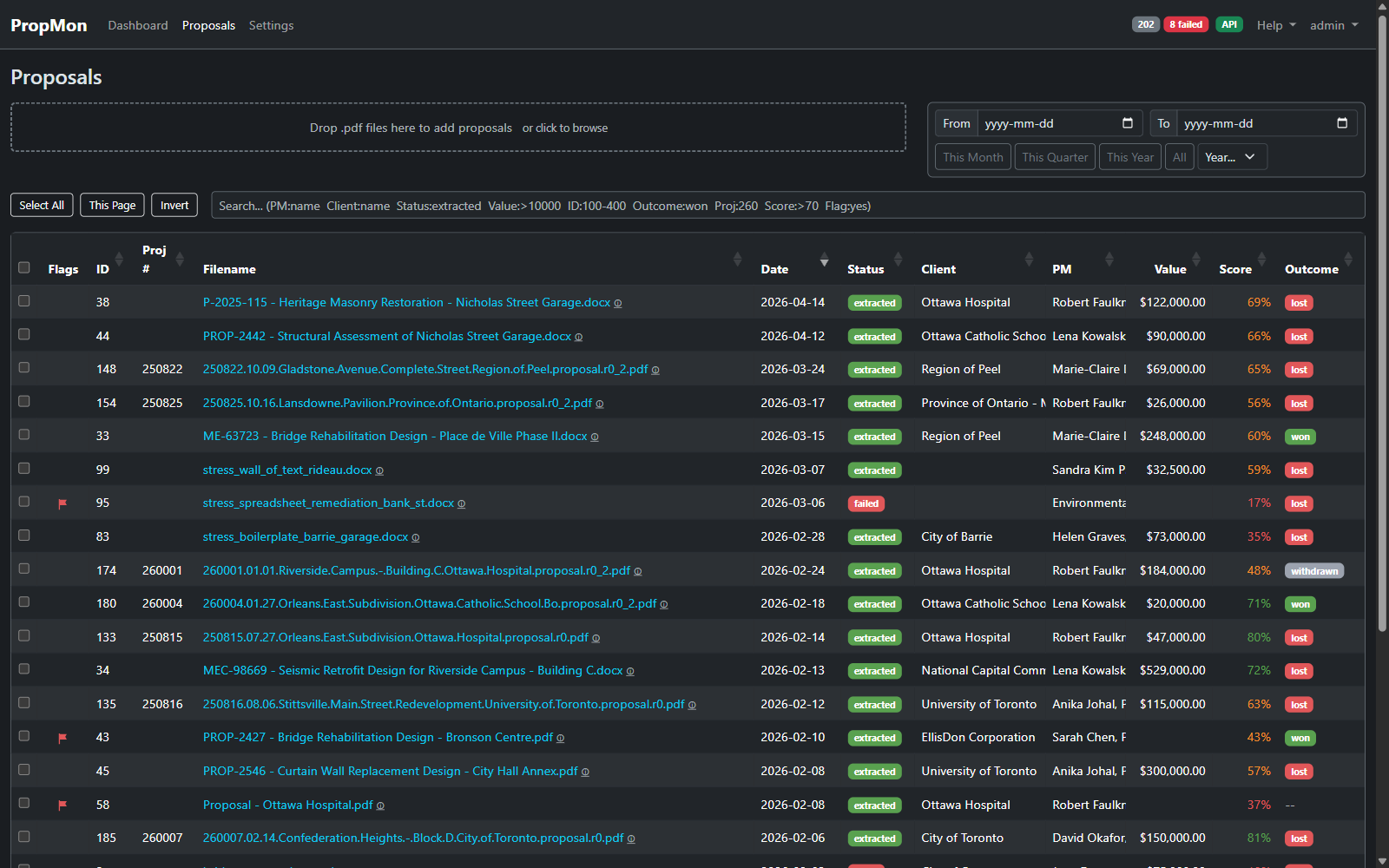
Sort by anything. Filter by anything. Export the slice to share.
Open one up
Everything we extracted, in one view.
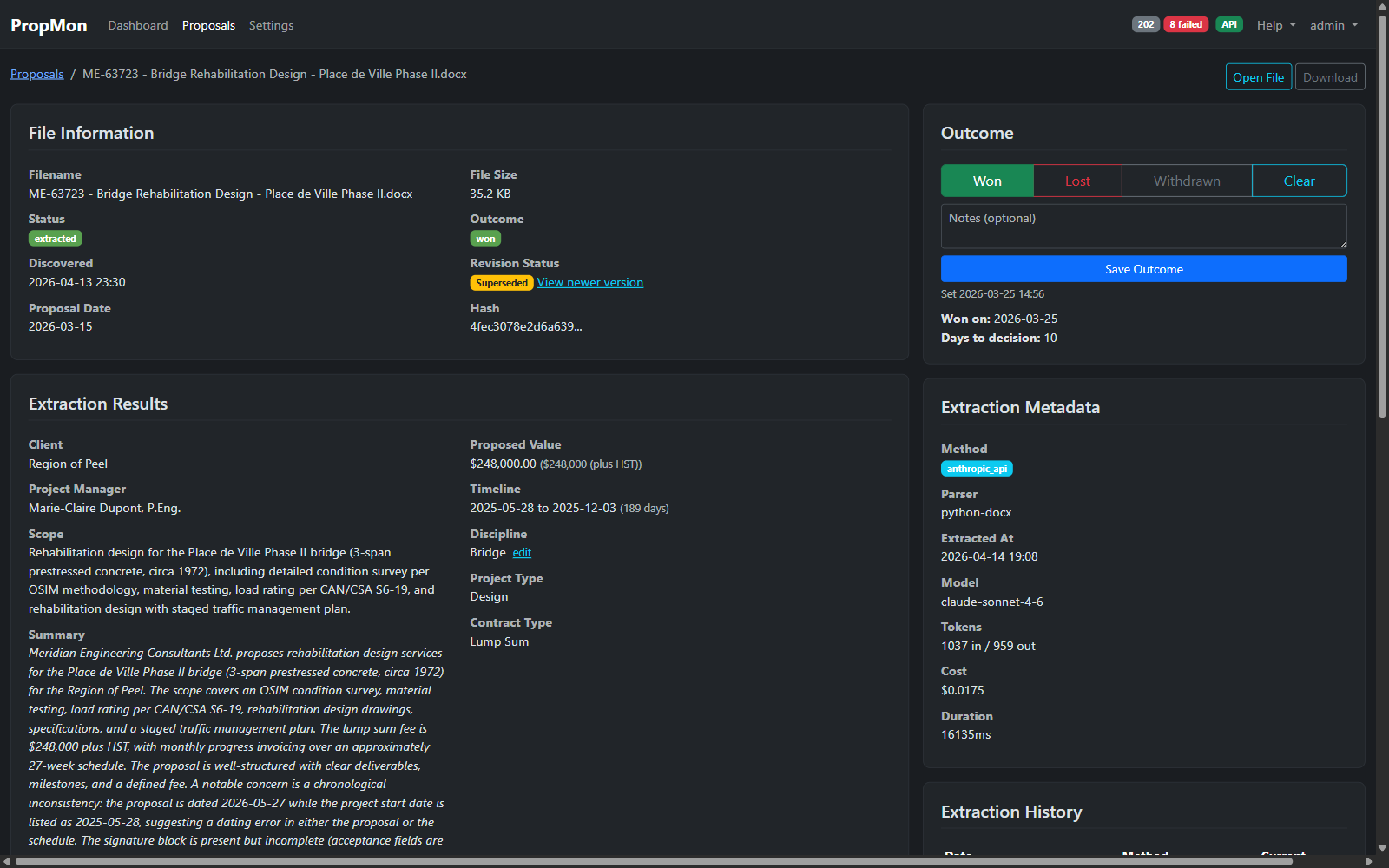
Extracted fields, raw text, every prior extraction attempt, and a one-click re-extract.
The system asks
PMs answer one weekly email. No login required.
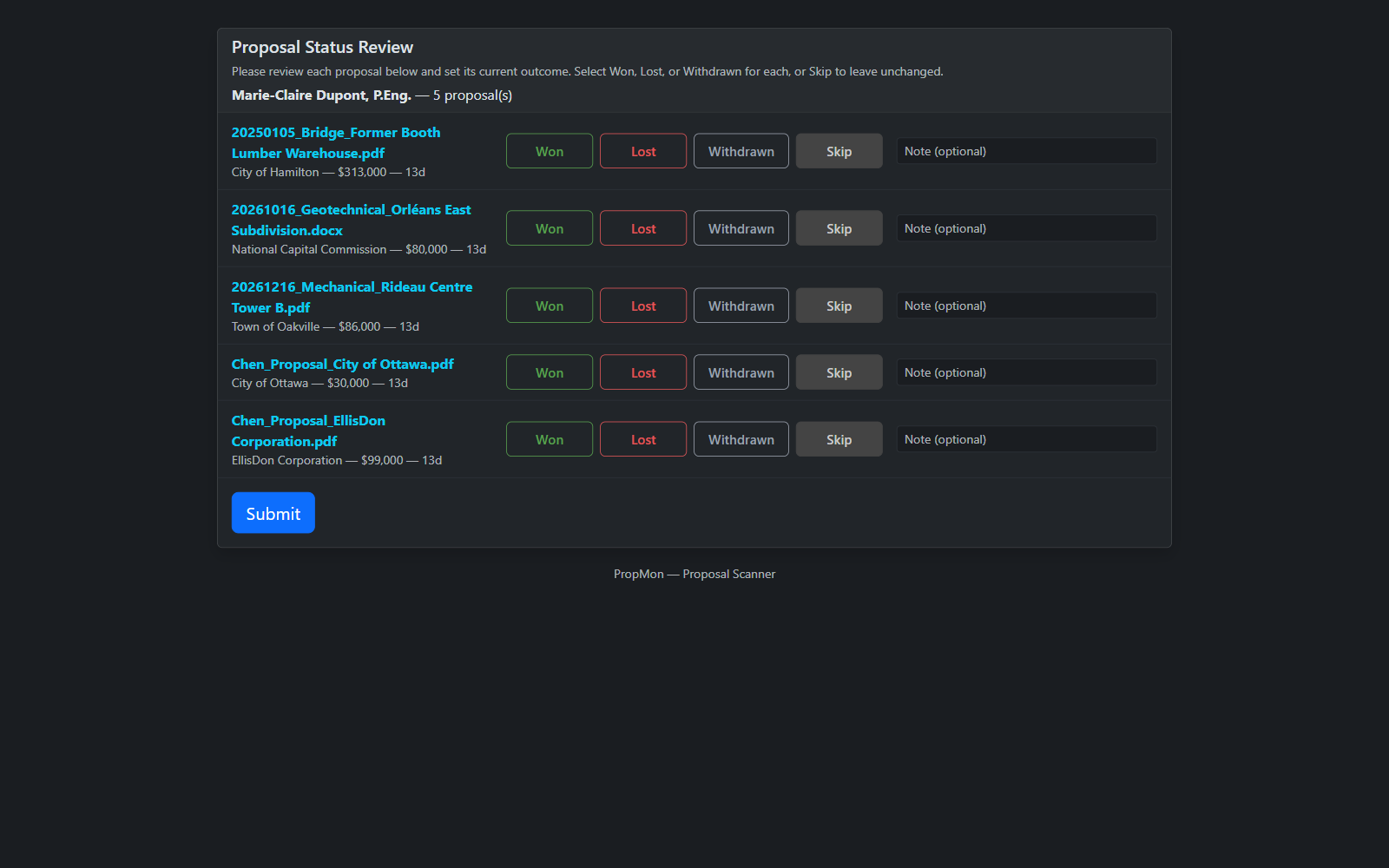
Each PM gets a token-based link. One click opens a bulk form with all their open proposals.
Mark won, lost, withdrawn, or "still pending" — done in 30 seconds.
No app to open. No password to remember.
When the answer is "lost"
We capture why, not just the outcome.
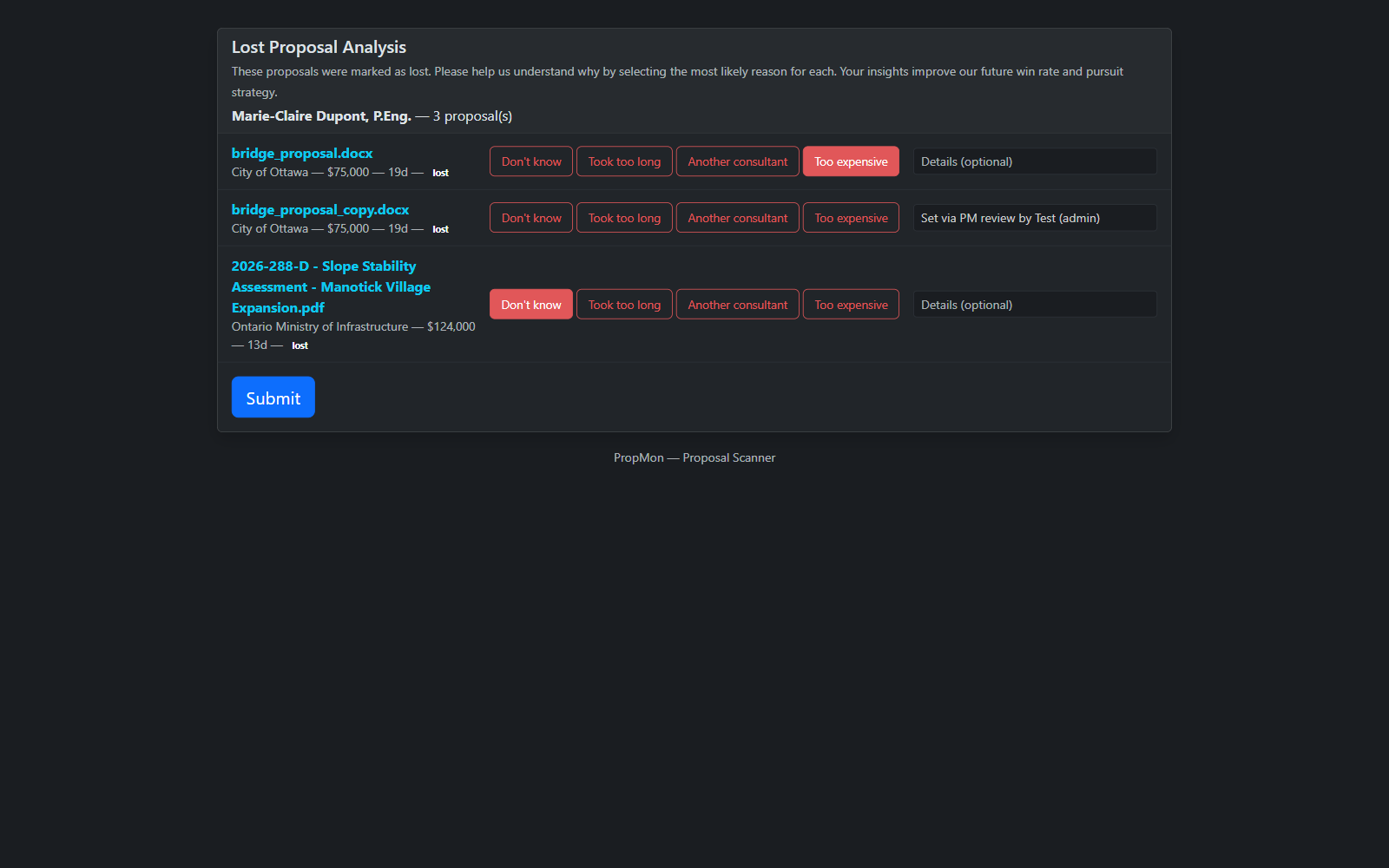
Structured reasons — fee, schedule, scope, relationship, no-decision — feed back into the dashboard.
Loss patterns surface. So do win patterns.
The data gets smarter every week.
Two automations you'll love
Fewer things you have to chase.
Auto-expiry
Proposals silent past your threshold (default 90 days) auto-mark as lost — with a flag so you can review.
Configurable per discipline.
Signed-copy detection
Drop the signed PDF in the folder. PropMon matches it to the original proposal and auto-marks won.
No data entry. The signature is the proof.
Both run silently. You only see them when they save you a chase.
A proposal enters — without anyone telling it to.
You save
to project folder
Watcher notices
within 60 seconds
Filters apply
project #, phrase, dedup
Queued
for AI extraction
Every PDF in the watch folder is checked for ###### project numbers and "LRL ENGINEERING" before it goes any further. Subconsultant docs and dupes get filtered out automatically.
AI reads it — automatically.
Pulled out
- Client
- Scope summary
- Project Manager
- Timeline (start, end, duration)
- Proposed value (CAD-normalized)
- Discipline (structural, mech, elec, civil, multi…)
How
Multi-engine extraction with automatic fallback.
If the primary AI is unavailable or over budget, falls back to local heuristics so the pipeline never stops.
All extraction history is preserved per proposal.
Quality is scored — automatically.
Completeness rubric
Every proposal scored 0–100 against a configurable rubric:
- Scope clarity
- Fee schedule
- Project schedule
- Assumptions / exclusions
- Signature block
- References / experience
Plus signals
- Grammar issue count + severity
- Project number presence
- Page-count check
- Currency normalization
All weights are tunable in admin.
Improve over time — without re-uploading anything.
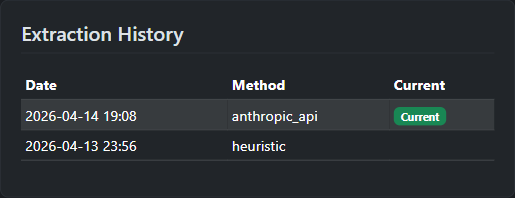
When the AI prompt or model improves, every prior proposal can be re-extracted in bulk.
Old extractions are kept as history. You can compare versions side by side.
No file uploads. No archive juggling. The watch folder is still the source of truth.
Tunable
76 settings, 10 admin tabs. No code changes for any of it.
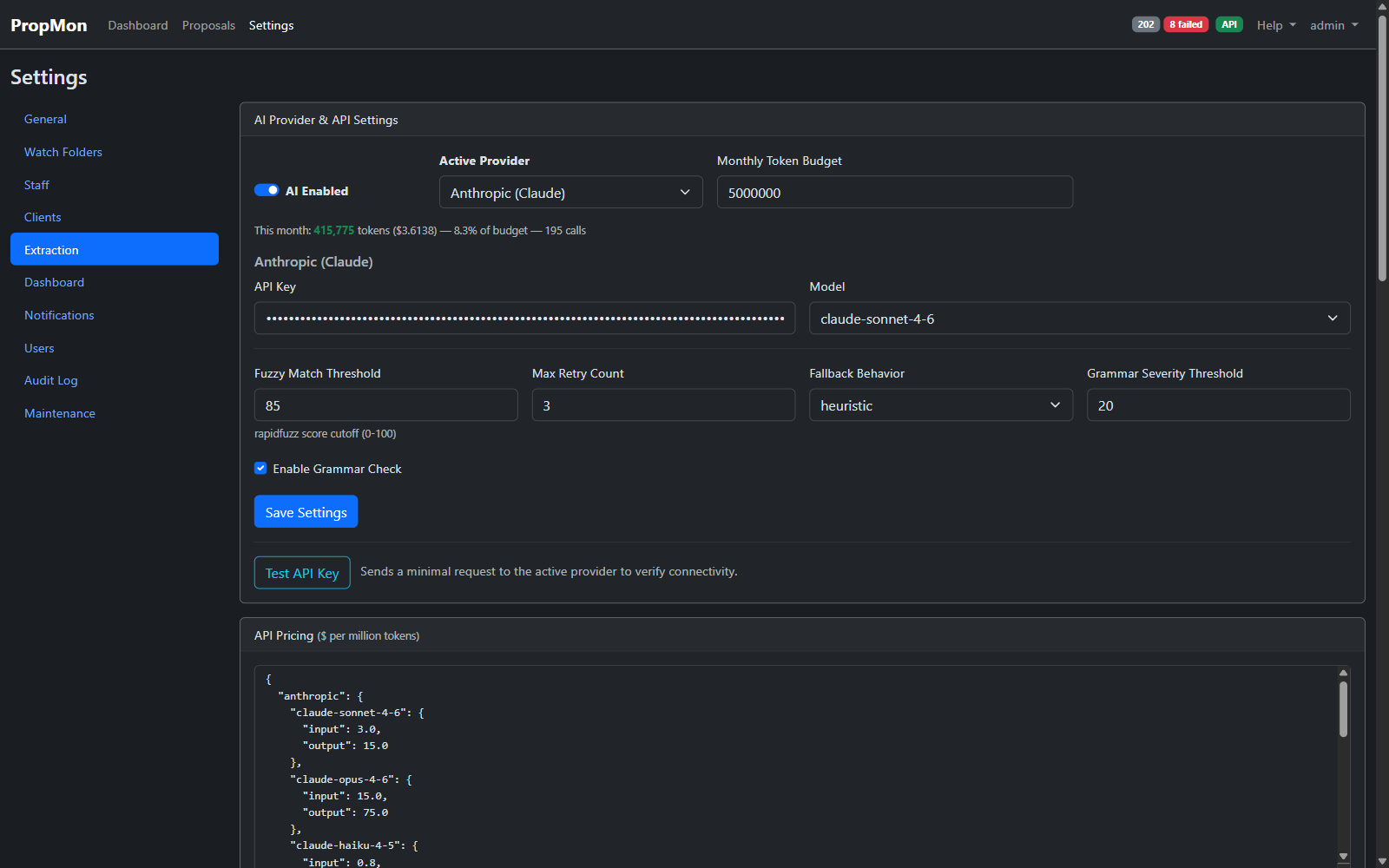
Watch folders · staff & aliases · clients · extraction rules · notifications · dashboard prefs · users · audit log · maintenance · general.
Roadmap
What's next.
Soon
- CSV / Excel export of any filtered slice
- Per-PM PDF scorecards (printable, monthly)
- Weekly digest email to leadership
- Loss / win reason analytics
Later
- LDAP / AD authentication
- Sub-scope extraction for multi-discipline proposals
- Watch-folder schedules (daily / weekly / monthly scans)
- Prompt diff view across extraction versions
Ready?
Get started
Open the dashboard
http://<host>:5045
Save proposals where you always do
PropMon's already watching that folder.
Watch the picture come to life
Within minutes of saving.
Live picture. Zero workflow change. Already running.
Public demo with fictional data. Log in as demo / demo. No real client data — all mutations disabled.