TaskFlow / Pitch
The notepad
that reads what you type.
A task platform built for AEC teams who hate task platforms. Plain text in. Real work out. Humans and AI agents working the same page.
01 / The Problem
Your team's work lives in five places. None of them is a task list.
Field notes on a phone. Punchlists in a binder. RFIs in Outlook. Reviews in a shared inbox. Reminders on a sticky.
By the time anything gets entered into "the system," the urgency has cooled and the context is gone. So nobody enters it. So the system is empty. So nobody trusts it.
What we actually do today
- Email someone and hope
- Text someone and hope
- Hand-write a list at the end of the day
- Forget the list
- Apologize on Monday
What that costs
- Slipped review deadlines
- Repeat site visits
- Lost RFIs and contractor change-order leverage
- No defensible record of who-asked-who-what
02 / Why the big tools fail us
They are built for software teams, not site teams.
| Asana / Monday / Jira | MS Planner / Teams | TaskFlow | |
|---|---|---|---|
| Time to enter a task | 30–60 seconds, six fields | 15–30 seconds, four clicks | One line. Hit enter. |
| Mobile-friendly capture | App, login, project, list, form | Buried in a tab | Same one line, anywhere |
| AI participation | Add-on, separate tool | Copilot rewrites, doesn't act | Agents are users — assign work to them |
| Audit trail | Yes, hidden behind clicks | Patchy | Every change, every actor, one keystroke away |
| Setup before useful | Workspaces, projects, templates | Plans, buckets, channels | Open it. Type. |
The honest take — these tools win on bigness. We win on getting out of the way.
03 / The Big Idea
A blank sheet of ruled paper that understands what you wrote on it.
No projects. No buckets. No boards. No setup.
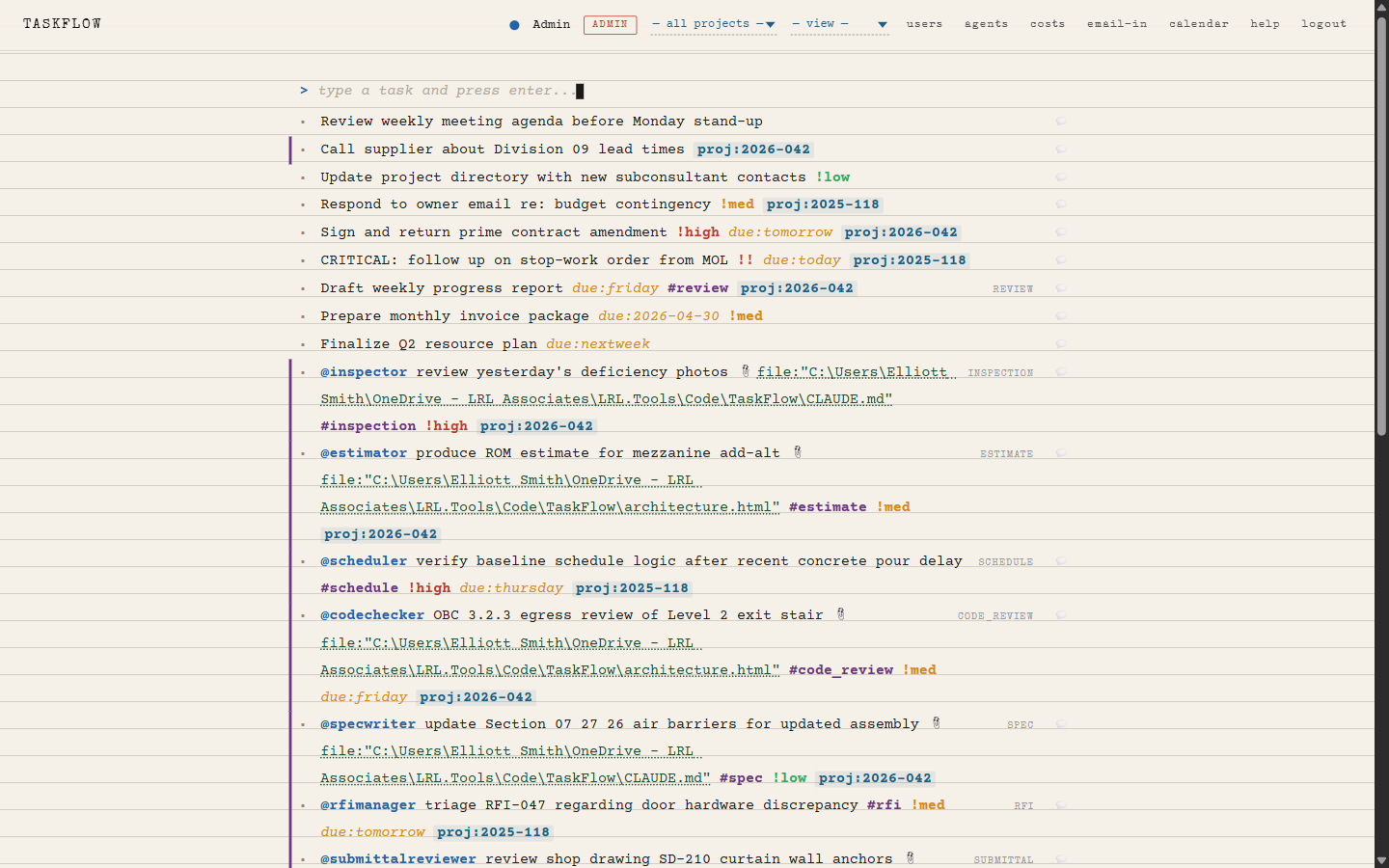
Open TaskFlow and you see ruled paper, a cursor, and the things you owe people. Type a line in plain English. We read it.
The application is the page. The page is the work. The cursor is always blinking, ready.
The whole product fits in one screenshot. That is the point.
04 / The text grammar
You already know how to use it.
Six tokens. They look like the things you'd scribble in a notebook anyway. Everything else is just words.
| You type | What we do | Looks like |
|---|---|---|
| @smith | Assigns task to user "smith" | @smith |
| !high or !! | Marks priority high | !high |
| !med or ! | Priority medium | !med |
| !low | Priority low | !low |
| due:tomorrow / due:friday / due:2026-05-01 | Sets a due date — natural language fine | due:friday |
| #review #inspection #form | Tags task type — controls who/what handles it | #review |
| ~blocked ~done | Sets status inline | ~blocked |
Whatever you type is preserved verbatim — the parser just teaches the system what the line means. Edit the line later and the meaning updates with it.
05 / Keyboard-first
If you can touch-type, you can outrun any other tool on the market.
Capture
- Ctrl + / jump to the input line
- Enter commit a task
- @ popup of teammates and agents
Move
- ↑ / ↓ walk the list
- Alt + ↑/↓ reorder
- Enter edit in place
- Esc save and go
Act
- Ctrl + D mark done
- Ctrl + Shift + H full task history
- Click a name filter to that user's lane
No mouse required
Most users never touch one. Field staff capture three lines on a phone in seconds. Project leads run the page at typing speed.
06 / The unlock
Agents are users.
An AI agent is just another name in the dropdown. @reviewer. @summarizer. @scheduler. You assign them tasks the same way you assign Sarah a task.
What that means in practice
- You delegate the boring half of your inbox
- The agent does what it can, hands back what it can't
- The audit trail is identical to a human handoff
- No new UI to learn — same notepad, same line
Built-in tools the agent can use
- create_task — spawn follow-ups
- reassign_task — pass to a human or another agent
- complete_task — finish with a result note
- update_task — append findings, change status
- escalate — bump to the configured human
07 / The decision flow
Each agent is a flowchart you can draw.
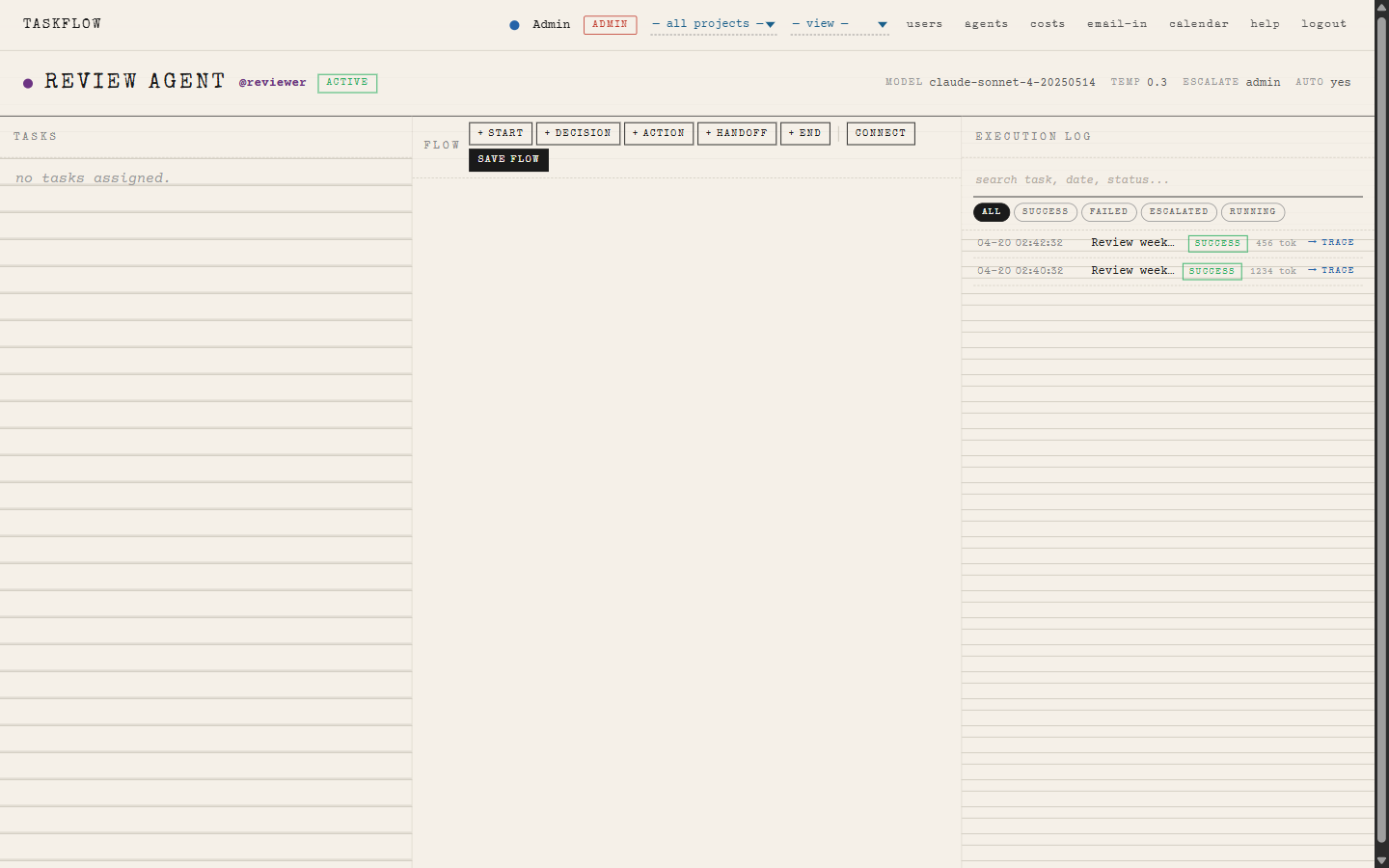
Open the agent, drag boxes, draw lines. Start node, decision diamonds, action prompts, handoff to a human, end. No code, no YAML.
Every run is logged: input context, model output, tools called, tokens spent, time elapsed.
08 / Agent workbench
One screen to watch, tune, and trust an agent.
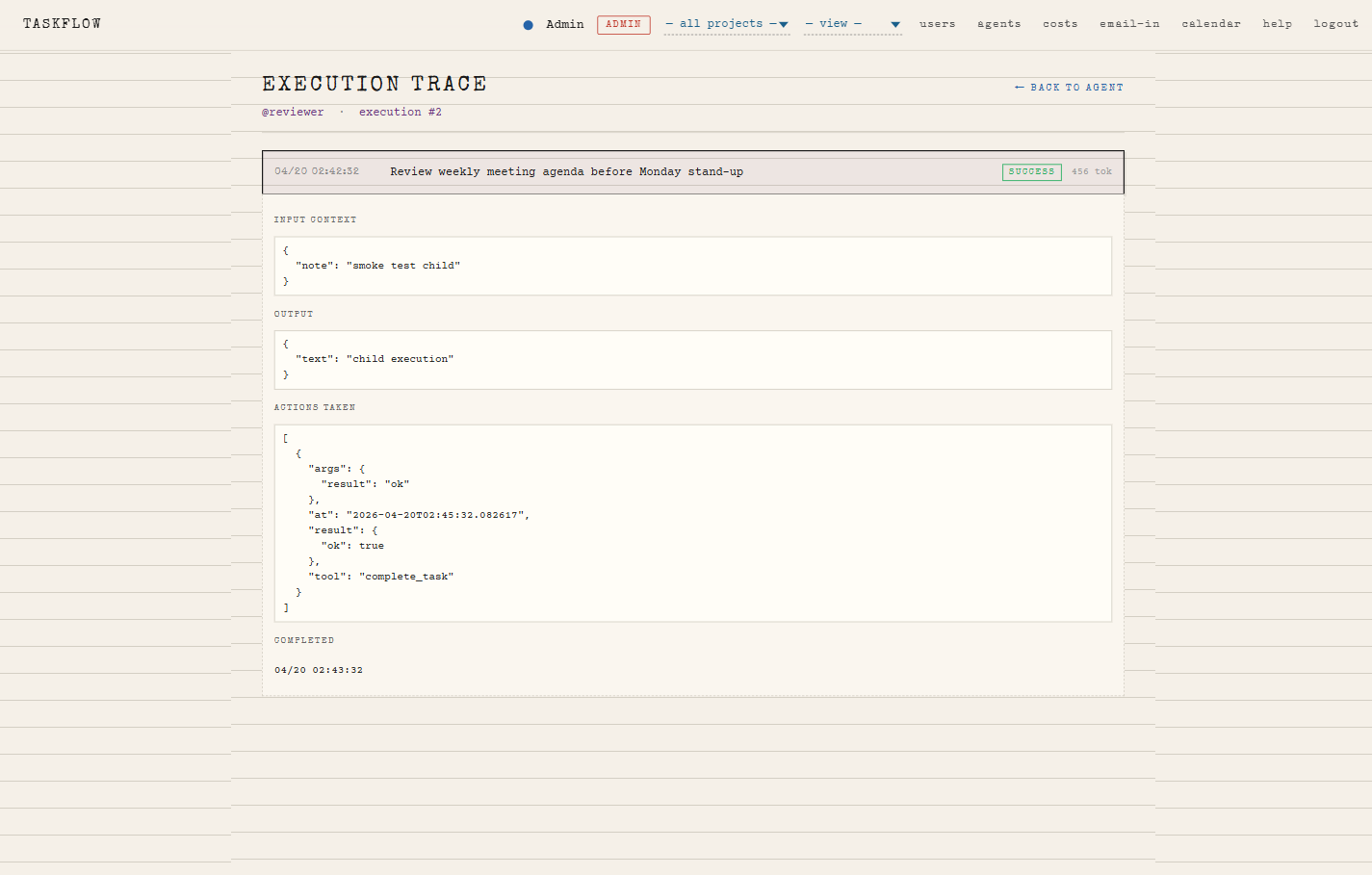
Click any log row to see the exact prompt sent, what came back, what tools fired, and what changed in the database. Nothing happens off-stage.
09 / Inside one agent run
Click a log row. Get the receipt.
{
  "system": "You are a submittal-review agent...",
  "task": {
    "id": 1840,
    "title": "review submittal #14 — door hardware",
    "raw_text": "@reviewer review submittal #14 !high #review proj:2026-042",
    "priority": "high",
    "created_by": "smith",
    "history": [ {...3 prior entries...} ]
  }
}
Submittal lists 12 line items vs spec section 08 71 00 (12 items). Quantities reconcile. Lines 14–22 (closer assemblies) reference manufacturer "ABC" — spec lists "ABC or approved equal"; no substitution request on file. Will flag for human eyes and complete the routine portions.
- update_task append_text="lines 1–13 reconcile against spec 08 71 00"
- comment_on_task body="ABC closer not on submittal record — substitution request needed"
- create_task raw_text="@smith resolve ABC closer substitution on submittal #14 due:tomorrow"
- complete_task result="routine portion approved; one item escalated to @smith"
Children: 1 follow-up task spawned (#1843). Click it to walk that branch.
10 / Use cases — real AEC workflows
Where this earns its keep.
Site walks & punchlists
Capture observations on a phone in plain English. @reviewer tags them by trade overnight; PM sees a clean list at 7 a.m.
Submittal & shop drawing review
Send a PDF to the reviewer agent. It checks against spec, flags discrepancies, hands the borderline ones to the engineer.
RFI triage
Agent classifies new RFIs by trade and urgency, drafts a first response, routes to the right consultant.
Progress claim sanity-check
Reconciles claimed quantities against approved schedule. Routine claims approved. Anomalies escalated with notes.
Inspection forms
#inspection-typed tasks open the right form, prefill site/contractor, and file the signed PDF on completion.
Daily handover
End of day, scheduler agent rolls overdue tasks, surfaces blockers, drafts tomorrow's list per person.
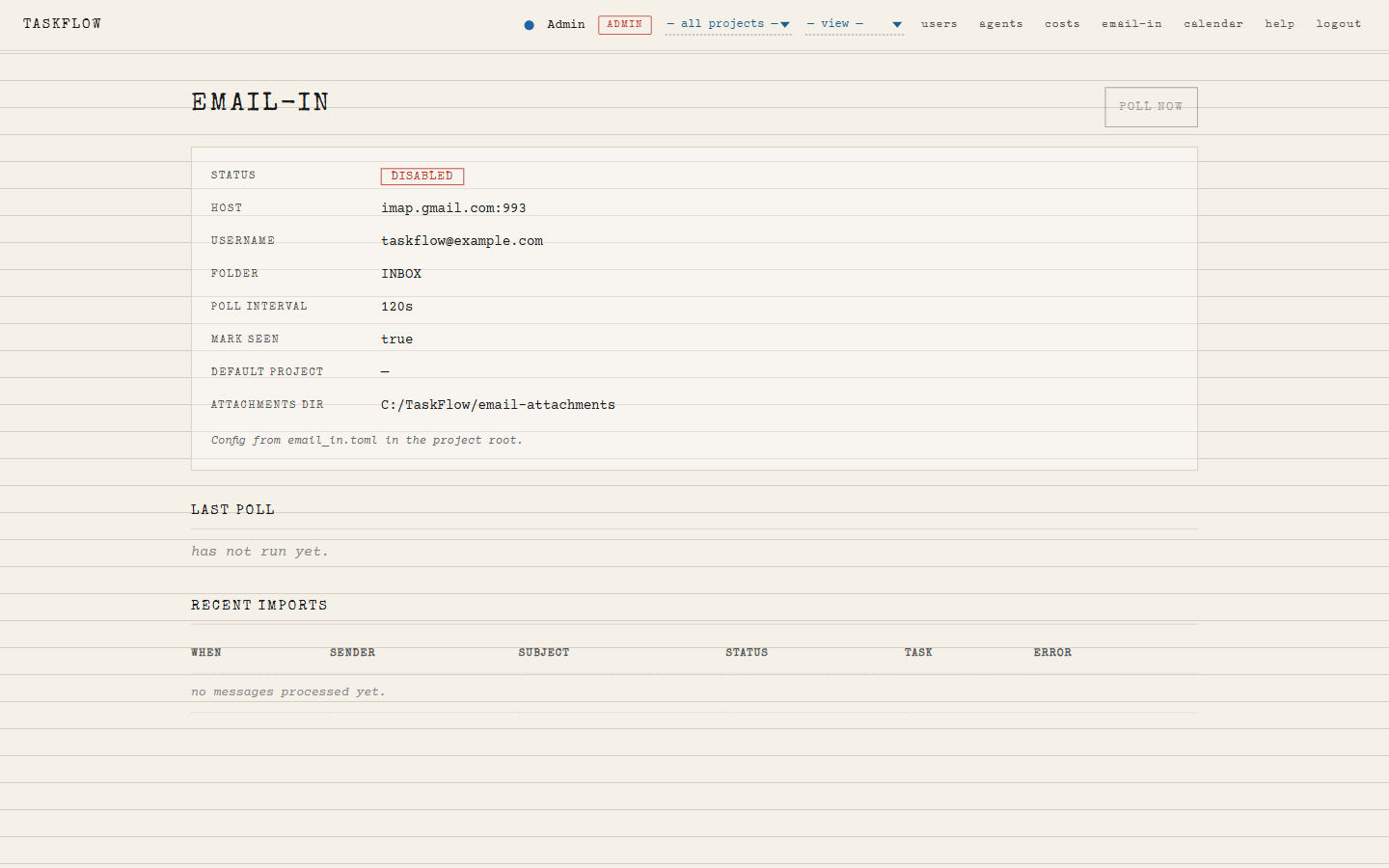
11 / Email-in
Your inbox becomes a task source.
Forward an email to a TaskFlow address. We parse the subject, the body, the attachments. We create a task and assign it to the right person — including an agent.
- One address per project, per agent, or per workflow
- Attachments preserved on the task
- Sender becomes the task creator (auto-mapped)
- Subject line tokens (@…, !high, due:…) parsed exactly like typed input
Worked example
Becomes:
12 / Other lenses on the same notepad
Same data, different angles. Always one click back to the page.
Notepad
The default. Linear, fast, keyboard-first. The view your team will live in.
Calendar
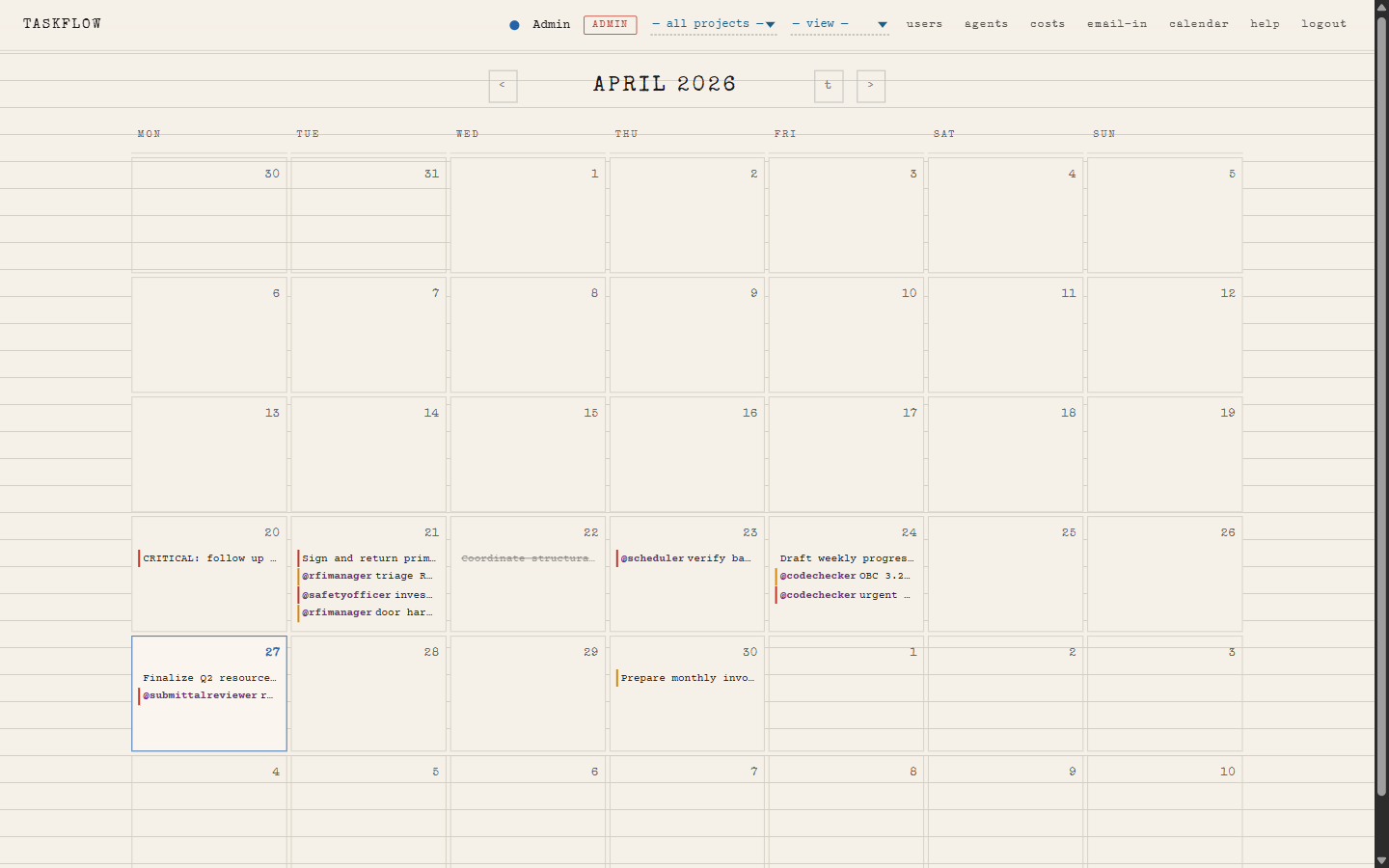
Anything with a due: token shows up where it belongs. Drag to reschedule.
Per-user lane
Filter by @person for one-on-ones, capacity checks, or daily standups.
Agent log
Every AI run, with the prompt and the cost. Searchable. Defensible.
History
Every change to every task: who, when, from what, to what, with what note.
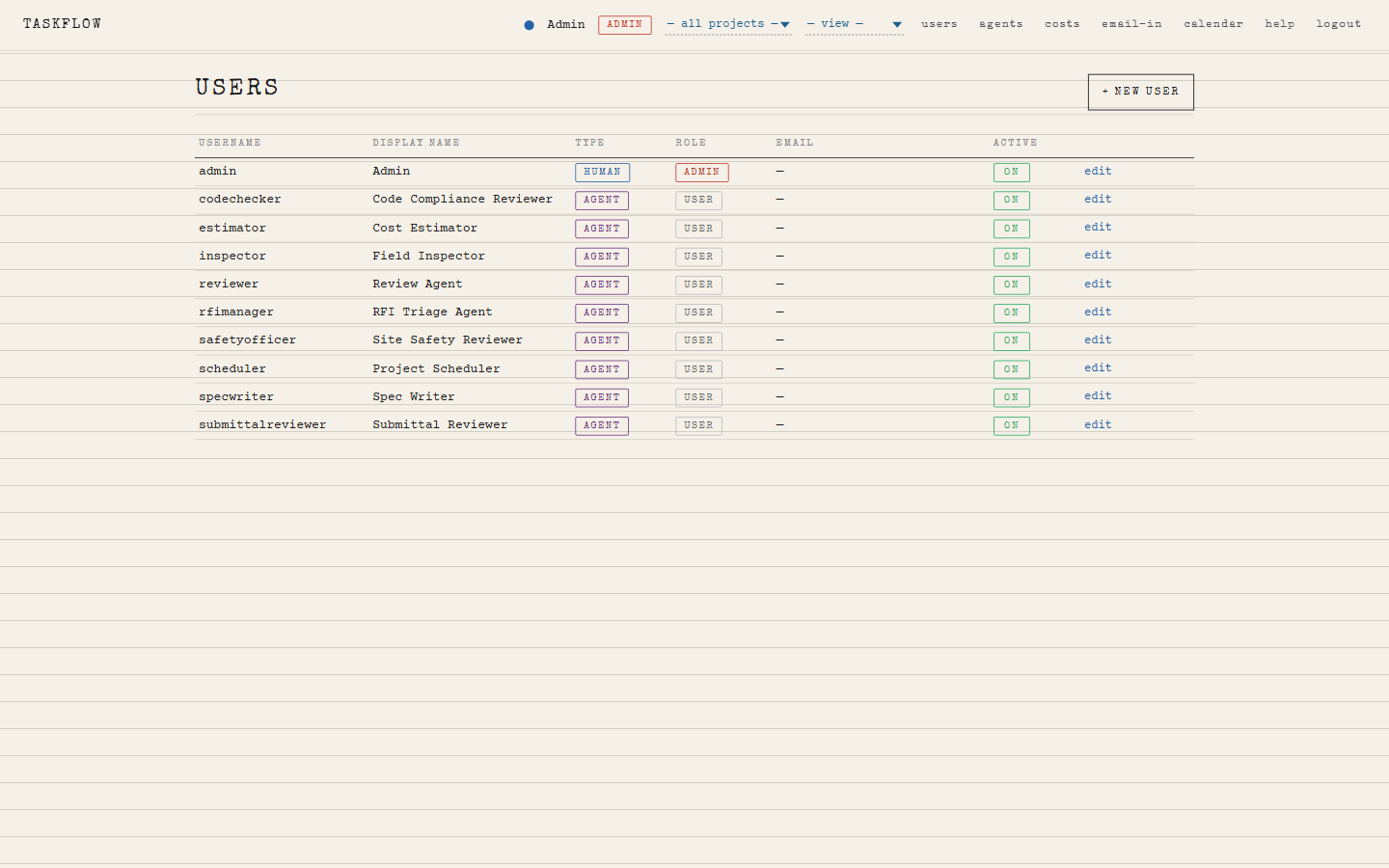
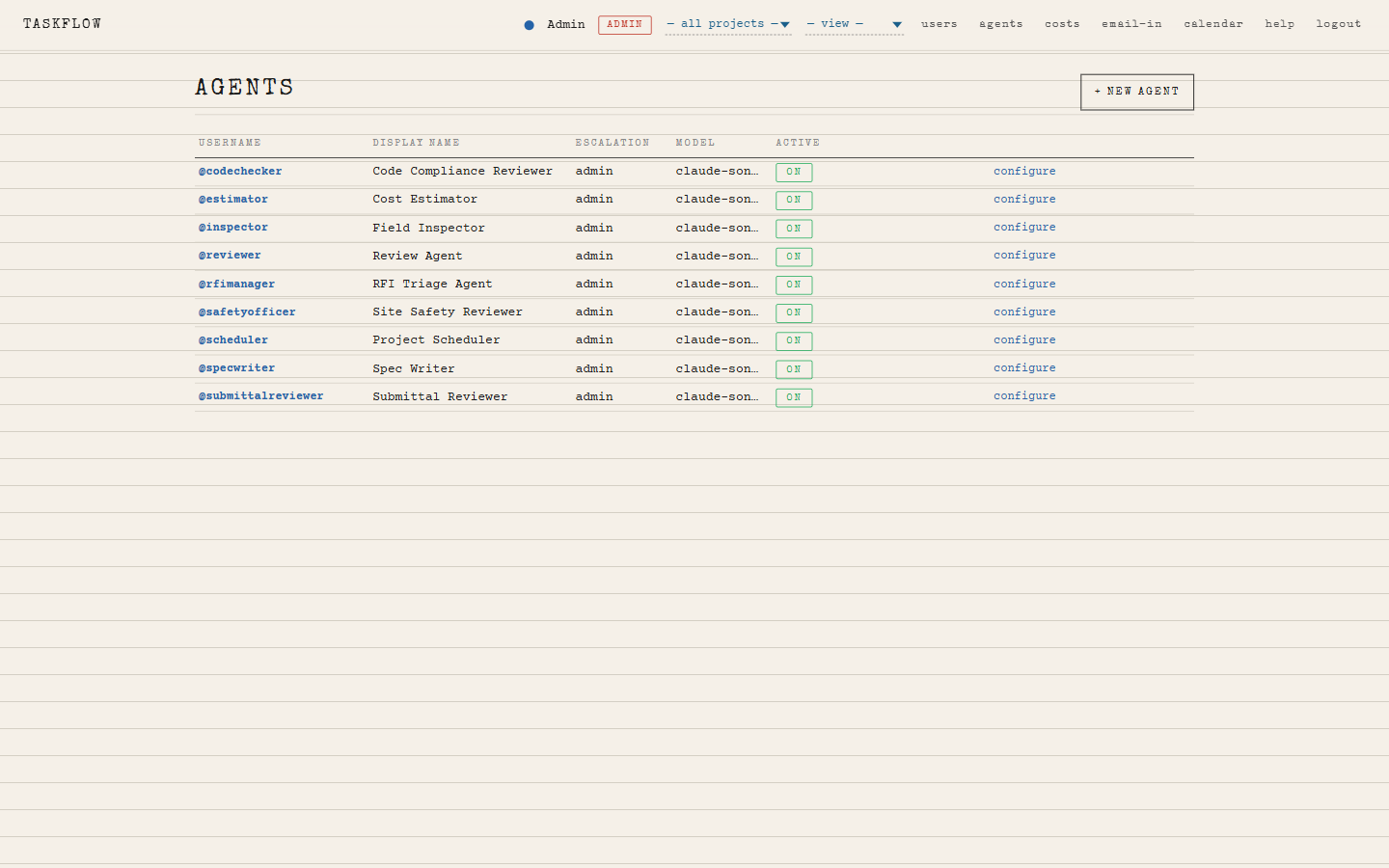
Admin
Users, agents, costs, email-in addresses. One screen each. No deep menus.
13 / Calendar + per-user lane
Same data. Different angle. One click home.
Anything with a due: token slots in. Drag to reschedule.
Filter the page to one person. Use it for stand-ups, 1:1s, capacity checks.
14 / Oversight without overhead
You see what the AI does. You see what it costs. You can stop it.
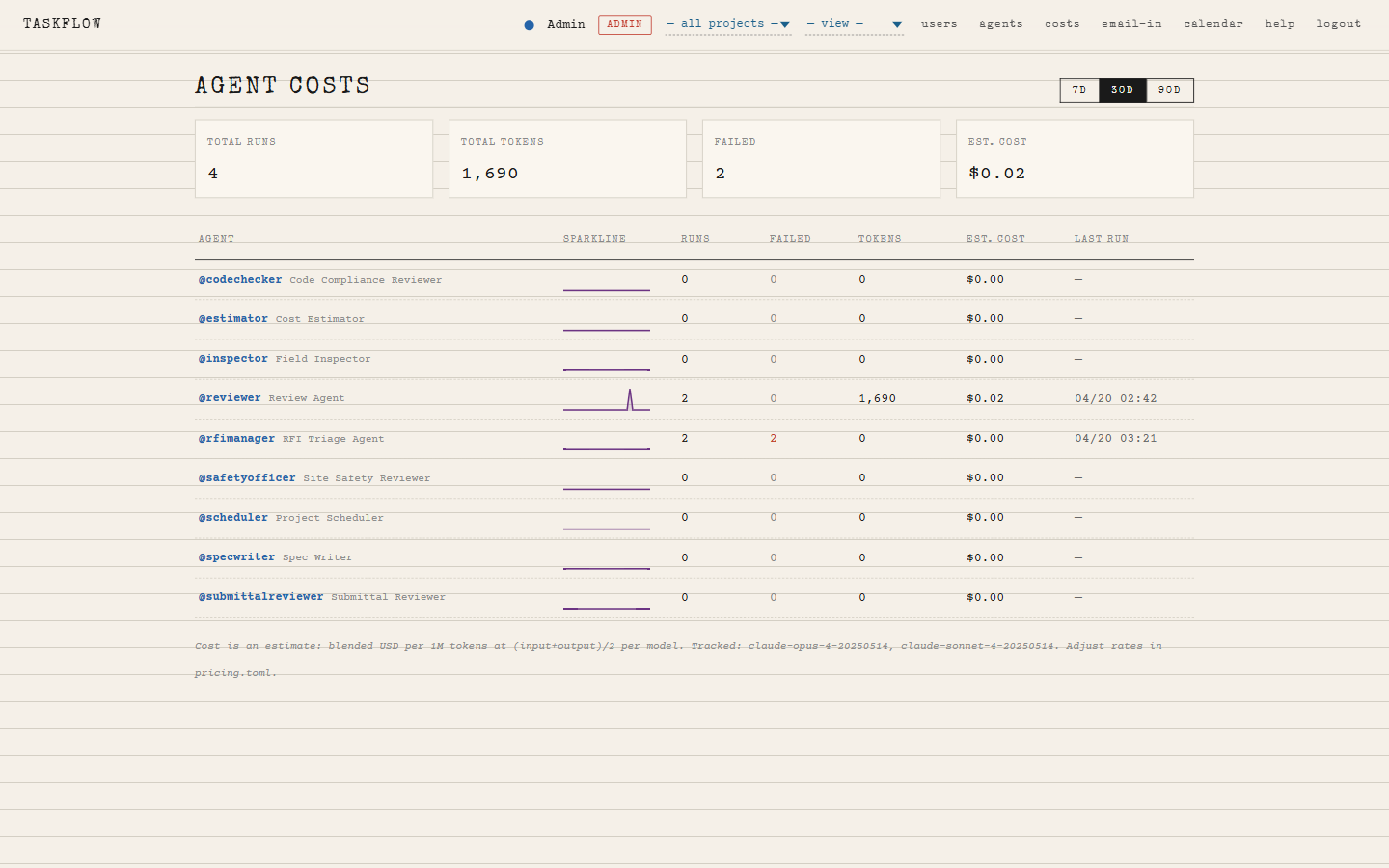
Per-agent cost ledger
Live tally of tokens and dollars by agent, by day. No surprise invoices. No black box.
Roles, not chaos
- Admin — manage users, agents, billing
- Power — author agent flows
- User — capture and complete work
Audit trail
Every task carries its full history. Every agent run carries its full input, output, and tools called. If a contractor disputes a decision, the receipt is one click away.
15 / Per-agent cost ledger
Tokens. Dollars. Per agent. Per day.
| agent | 30d trend | runs | failed | tokens | est. cost | last run |
|---|---|---|---|---|---|---|
| @reviewer Review Agent | 742 | 3 | 1.4M | $11.80 | 04/27 14:02 | |
| @summarizer Summary Agent | 388 | 1 | 520k | $4.30 | 04/27 13:40 | |
| @scheduler Scheduler Agent | 154 | 3 | 180k | $2.30 | 04/27 09:00 |
Estimate: blended USD per 1M tokens, (input+output)/2 per model. Adjust rates in pricing.toml.
16 / The admin pages
Three flat lists. No deep menus.
17 / Audit trail, one keystroke away
CtrlShiftH opens the history of the selected task.
Every field. Every actor. Every timestamp. Defensible by default.
18 / Why this matters
Time back, and a record you can stand behind.
Time
The cost of a project tool is the cost of using it, not buying it. We bring task entry from a minute to a sentence. For a 12-person consulting team, that's hours a day.
Quality
Agents handle the routine reviews. Engineers see only the items that need human judgement. Less rubber-stamping. Fewer misses.
Defensibility
Every task, every change, every AI decision is logged. When something goes sideways three years from now, the file is intact.
What we believe a small team gets back
Numbers from internal pilot, not survey data — happy to walk through the math.
19 / How it deploys
Local-first. Boring on purpose.
- Single Python service. Waitress on Windows, no admin rights.
- One SQLite file holds the whole instance. Back up by copying the file.
- Anthropic Claude API for agent calls — no other cloud.
- Email-in via standard IMAP, your existing mail server.
- Runs on a workstation, a closet PC, or a Linode box. Your call.
What we are not doing
- No multi-tenant SaaS holding your data hostage
- No custom AI models on your project files
- No telemetry to a vendor cloud
- No bundle of integrations you'll never wire up
20 / Roadmap
Shipped, shipping, next.
Shipped
Next 90 days
21 / Cheatsheet
Two columns. Print it. Tape it next to the monitor.
Keys
Tokens
Tokens parse in any order. Raw text is preserved verbatim.
22 / Get started
Try it on one project for one week.
No procurement. No migration. Pick a live project, point your team at the URL, ask them to capture work in plain English for five working days.
Day 1
Three users, one project, capture only. Don't change any other workflow.
Day 3
Turn on @reviewer for one task type. Watch the log.
Day 5
Compare what's in TaskFlow against your inbox. Decide.
Questions?
The page is the demo. Let's open it.
TaskFlow — built at LRL Associates. Local. Honest. Fast.
Appendix
The actual
screenshots.
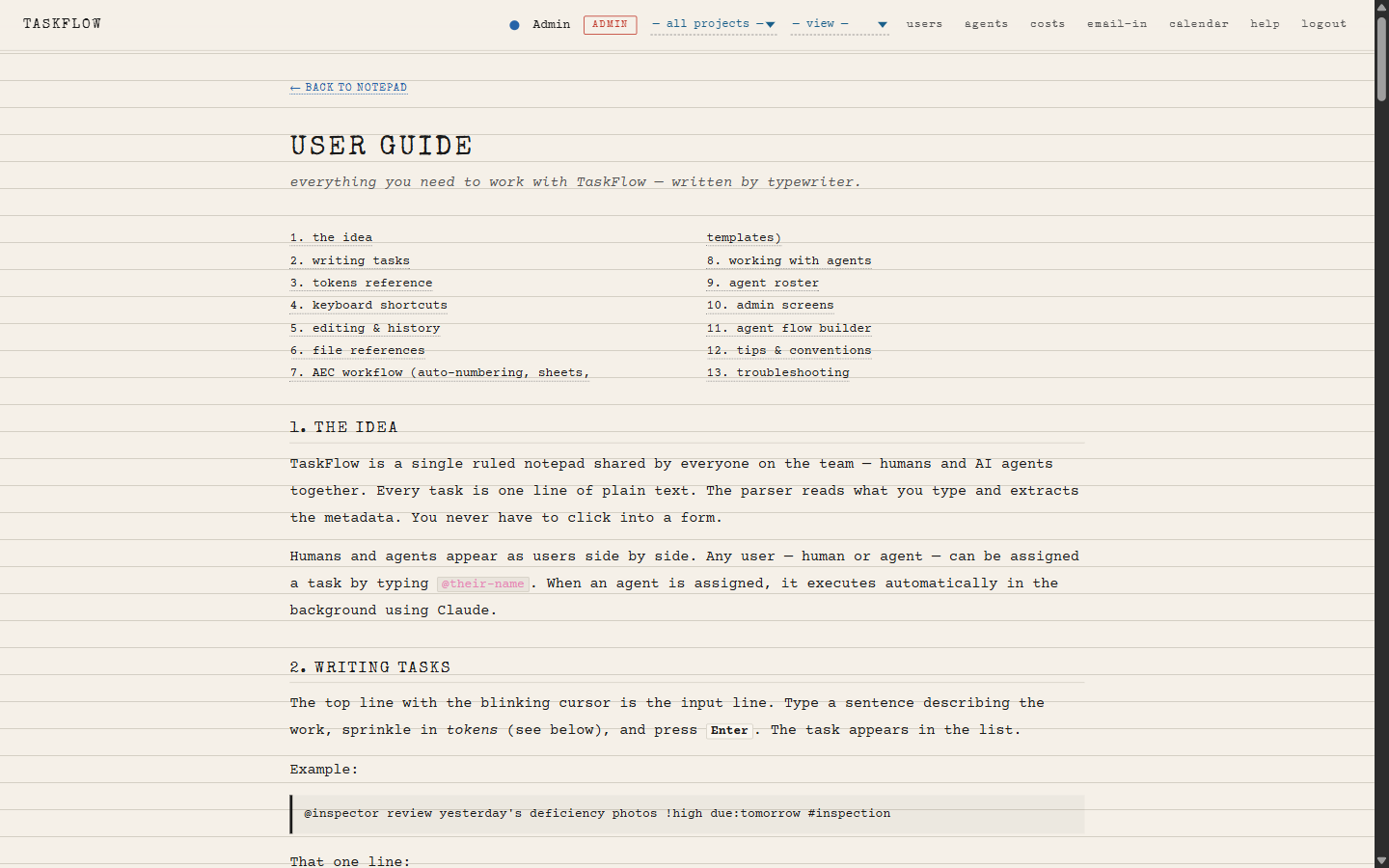
The slides above were drawn on the same paper the rest of the deck is on, so the aesthetic stays clean. The next pages are unedited captures of the running app.